SecurityXploded.com
Simple Website Blocker - Free Tool to Block or Unblock any Website on Windows | www.SecurityXploded.com
Simple Website Blocker

Version: 7.0

See Also
Contents
 
About
Simple Website Blocker is the Free tool to easily Block or Unblock any Website on your Windows system.

It offers universal website blocking solution which works across all web browsers like Firefox, Chrome, IE, Safari etc. And there is no need to install any browser extensions/add-ons

It is ideal tool for administrators to selectively block distracting websites like Facebook, YouTube etc. Also parents can use it to prevent their kids from visiting social or gaming websites.

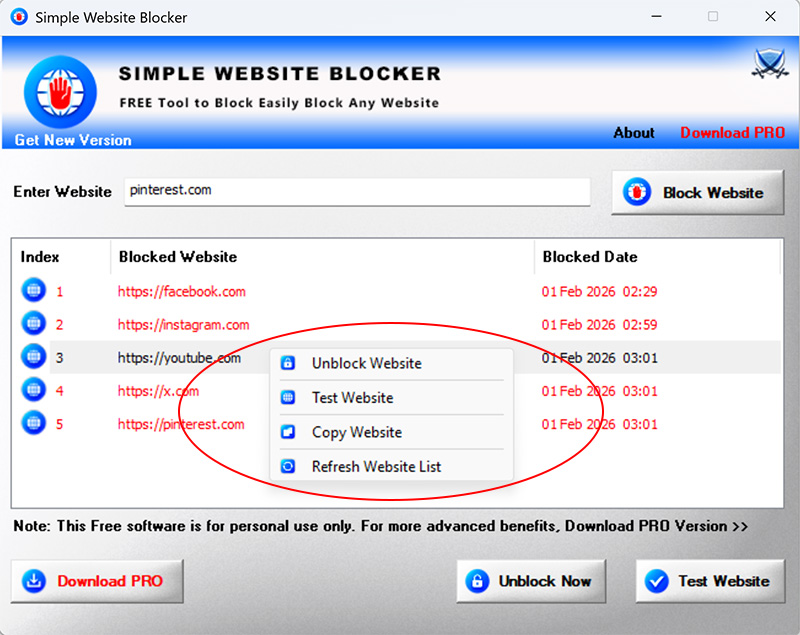
When you launch this tool, it displays list of currently Blocked websites. You can then select any of the Blocked website and Unblock it instantly with just a click.Once you block or Unblock a website, it is effective immediately. There is no need to log-off or restart the system.

For more advanced benefits Download PRO Version
Download XenArmor Website Blocker PRO

Simple Website Blocker is fully portable and does not require JAVA, .NET or any other components. It works on both 32-bit & 64-bit systems starting from Windows Vista to Windows 11

 
Features & Benefits
  • Free Tool to easily Block or Unblock any Website
  • Block Websites across all Web Browsers
  • Does not Install any Browser Extensions or Add-ons
  • So No Privacy concerns unlike other similar solutions
  • No app running in the background
  • No need to Log-off or Restart the system
  • Displays list of all the Blocked Websites
  • Test the Blocked Website for quick verification
  • Useful for Administrators and Parents
  • Very Easy to use tool for all type of users
  • Fully Portable, does not require Java or .NET
  • Supports all Windows platforms from Vista to Windows 11
 
How to Use?
Simple Website Blocker is easy to use with its simple GUI interface. 

Here are the brief usage details

  • Launch' Simple Website Blocker' on your system as Administrator
  • Enter website name (like facebook.com or youtube.com)
  • And click on "Block Website" to Block it and it will be added to list of blocked websites as shown in the screenshot below.
  • Now you can right click to see various menu options or click on buttons at bottom.
  • For verification, click on 'Test Website' to quickly check if its blocked or not
  • To Unblock, select the Website from the display list and click on 'Unblock Website' button.

Important Note:
1. If your Browser (Firefox/Chrome etc) is already open then you have to close and open it again for changes to take effect.
2. If Antivirus is running then please disable it temporarily for blocking/unblocking operation to succeed.
3. facebook.com and apps.facebook.com are two different websites. So you have to enter each of these websites separately to Block them.

 
Screenshots
 
Release History
Version 7.0 :  1st Feb 2026
New 2026 edition support blocking of websites for Windows 11. Enhanced GUI interface for easier blocking and unblocking operation.
 
Version 6.0 :  18th Oct 2019
Major 2019 release with few fixes and improved website blocking features
 
Version 5.5 :  16th Oct 2018
Enhanced website blocking functionality with few changes.
 
Version 5.0 :  10th Mar 2018
Major 2018 release with enhanced blocking website feature along with new right click menu options.
 
Version 4.0 :  27th Aug 2015
Major 2016 edition with new Installer for simple installation & un-installation. Also made few improvements on timestamp and UI display.
 
Version 3.0 :  27th Aug 2015
Mega release with support for new Windows 10 version. Also fixed the sizing problem with higher resolution computers.
 
Version 2.0 :  29th Jan 2015
Major version to support websites with country code extensions. Integrated many fixes including one to remove duplicate websites. Also integrated Uninstaller into Windows Add/Remove Programs.
 
Version 1.0 :  1st Nov 2013
First public release of SimpleWebsiteBlocker
 
 
Download
FREE Download Simple Website Blocker v7.0

License  : Freeware
Platform : Windows 11,10,8,7,Vista (32-bit/64-bit)

Download
 
See Also